It’s a rainy evening in Mumbai. You’re finishing up your work when thunder cracks the sky. Lights flicker, and within seconds, your office is in darkness. The UPS beeps, but your NAS Server doesn’t come back online. Panic sets in. Years of project files, accounting data, or even your child’s digital memories are on that server.
If you’ve faced this situation, you’re not alone. In India, power fluctuations during monsoons are a reality. Sudden surges due to lightning strikes or erratic electricity supply damage hundreds of NAS units every year. But the good news? NAS Server Data Recovery is not only possible but often highly successful when done correctly.
This blog is written with empathy and technical clarity. We will walk you through why NAS failures happen during storms, how to identify signs of damage, what steps to take, how to recover your data safely, and how to prevent future disasters. So, take a deep breath your data can still be saved.
How Power Surges and Lightning Strikes Impact NAS Servers
Power surges are sudden voltage spikes in your electrical system. In India, they are often caused by lightning, power grid switching, faulty wiring, or transformer faults. Though they last milliseconds, the impact can be permanent for electronics.
What Components Get Damaged?
✅ RAID Controller: Controls how data is spread across drives. Failure here means unreadable RAID.
✅ Power Supply Unit (PSU): A surge can fry it, preventing the NAS from booting.
✅ Hard Drives: Delicate components may develop bad sectors or completely fail.
✅ Motherboard/PCB: Damaged boards can render the entire NAS inoperable.
Symptoms of Power Surge Damage:
✅ NAS does not power on.
✅ Blinking or red error LEDs.
✅ Loud beeping or unusual clicking sounds.
✅ Drives not being detected.
✅ Admin interface inaccessible.
Real-World Example:
A small digital agency in Coimbatore lost access to their Synology NAS Server after a nearby transformer blew during a storm. Though the system wouldn’t turn on, the drives were fine. With help from Techchef Data Recovery, all 3TB of project files were successfully restored.
💡 Did You Know? Even if your NAS doesn’t turn on, your drives might still be healthy and fully recoverable.
First Steps to Take Immediately After a NAS Failure
When disaster strikes, the right first steps are critical. It can mean the difference between full recovery and total loss.
What NOT to Do:
✅ Do not turn the NAS back on repeatedly.
✅ Do not remove or mix up the order of the drives.
✅ Do not attempt a “factory reset.”
What You SHOULD Do:
✅ Power Off the NAS and unplug it from the wall.
✅ Label each drive according to the slot it came from.
✅ Listen for any odd noises – clicks or beeps can indicate failing drives.
✅ If using a UPS, check logs to see if it failed during the surge.
✅ Keep the NAS untouched and contact professionals if unsure.
💡 Did You Know? Touching or unplugging a drive without grounding yourself can cause static discharge damage.
Assessing the Extent of Damage
Not all NAS failures are equal. Some are minor electrical issues; others involve deep file corruption.
Steps to Diagnose:
✅ Visual Inspection: Look for burn marks or a burnt smell near power ports.
✅ LED Status: Blinking red or no light at all is a warning.
✅ Admin Panel Access: Try accessing the NAS IP from another device.
✅ Error Codes: Many brands like QNAP or Synology display system status through codes.
Determine the Type of Failure:
✅ Hardware Failure: No lights, no sound, or physical damage.
✅ Software/Logical Error: RAID errors, missing volumes, or corrupted files.
💡 Did You Know? Some advanced NAS systems store RAID configuration logs which can be extracted even after failure.
Step-by-Step Guide to Recover Files from a NAS After Power Surge
⚠️ Caution: Only attempt the following steps if you’re technically confident. Else, contact experts like Techchef Data Recovery.
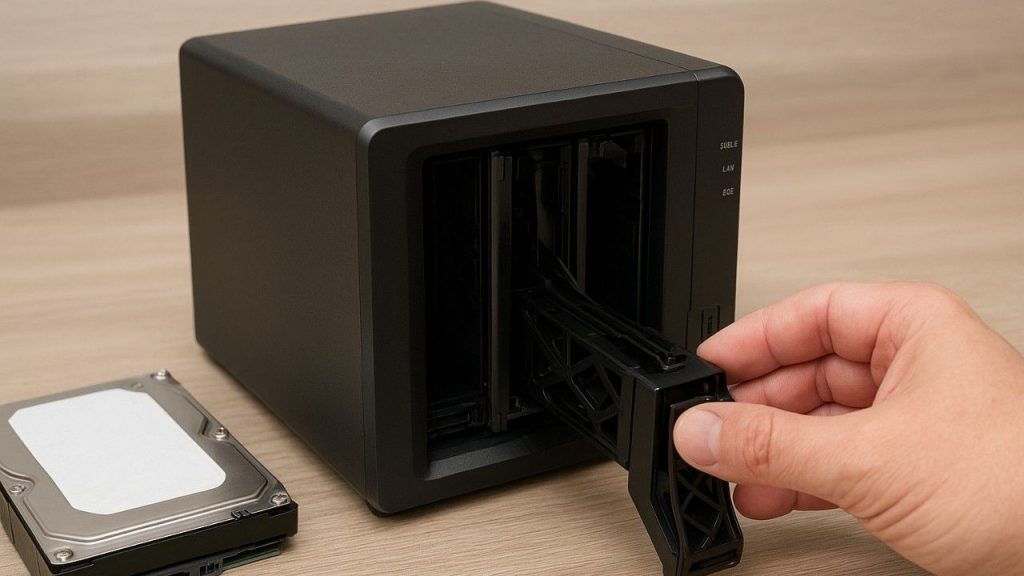
Step 1: Power Off the NAS and Remove Drives
✅ Disconnect power.
✅ Carefully remove drives and label their exact order.
Step 2: Clone Each Drive
✅ Use tools like ddrescue, R-Studio, or HDClone.
✅ Always work on clones, not originals.
Step 3: Determine RAID Configuration
✅ RAID 0, 1, 5, 6, 10?
✅ Use documentation, NAS logs, or contact the manufacturer.
Step 4: Reconstruct the RAID (Read-Only Mode)
✅ Tools: UFS Explorer, RAID Reconstructor, or mdadm (Linux).
✅ Avoid auto-rebuild prompts from NAS software.
Step 5: File System Scan
✅ Common file systems: ext4, btrfs, NTFS.
✅ Recover files to a separate, healthy external drive.
Step 6: Stop If It Feels Wrong
✅ If tools crash, or drives start clicking – stop and call professionals.
💡 Did You Know? Incorrect RAID order can render your entire array unreadable. Always document drive slots before removal.
Common Mistakes to Avoid During NAS Recovery
Here are some well-intended actions that often make things worse:
✅ Formatting or reinitialising the NAS.
✅ Changing the RAID mode without backups.
✅ Mixing up the drive order.
✅ Running repair tools without understanding RAID structures.
✅ Continuing to power cycle a damaged NAS.
✅ Opening hard drives in dusty, non-cleanroom conditions.
💡 Did You Know? Professional labs use Class-100 cleanrooms to open and inspect damaged drives without contamination.
When Data Recovery is Still Possible Even After Heavy Damage
It’s easy to assume that a fried NAS means all is lost. That’s rarely the case.
Here’s Why There’s Still Hope:
1. Even if NAS won’t power on, drives are often unharmed.
2. RAID 5 and 6 use parity data to recover missing info.
3. Logical issues (deleted files, corrupted volumes) are usually reversible.
4. Damaged NAS enclosures can be swapped with working units for drive access.
💡 Did You Know? Files can still be recovered from partially damaged drives using sector-level analysis.
Professional NAS Data Recovery Process
When things get complicated, trusted experts like Techchef Data Recovery offer safe, secure solutions.
Their Step-by-Step Process:
1. Diagnosis: Initial inspection of drives and NAS enclosure.
2. Cloning: Bit-by-bit copies made using forensic tools.
3. RAID Emulation: Virtual reconstruction of the RAID.
4. File System Repair: Recover data from corrupted or missing volumes.
5. Verification: Data integrity is tested before delivery.
6. Secure Return: Data returned on encrypted drives or your own device.
Common Indian Recovery Cases:
✅ A Delhi hospital recovered patient records from a lightning-damaged NAS.
✅ A CA firm in Surat restored 6 years of accounting data.
✅ A Chennai photographer got back all his wedding photos after a NAS crash.
💡 Did You Know? Techchef has handled over 30,000+ successful NAS Drive Data Recovery cases across India.
Tips to Protect Your NAS from Future Power Surges or Lightning Damage
Being proactive is the best protection. Here’s how you can shield your NAS Server from future harm:
Smart Prevention Tips:
✅ Invest in high-quality surge protectors or an online UPS with AVR.
✅ Never plug your NAS directly into the wall socket.
✅ Maintain regular backups to cloud or a second NAS.
✅ Enable S.M.A.R.T. monitoring and health alerts.
✅ During storms, temporarily disconnect NAS from power and internet.
✅If possible, use grounding equipment during monsoon.
💡 Did You Know? An online UPS offers zero-switch time and filters surges far better than an inverter.
Conclusion
We understand how terrifying it feels to lose access to your NAS Server. It’s not just about hardware it’s memories, business continuity, and peace of mind. The stress, uncertainty, and fear are real. But so is hope. Modern tools and experienced professionals can often recover your data even from severely damaged systems. What matters is acting with care, avoiding hasty decisions, and knowing that recovery is a process, not a race.
So if your NAS is silent after a storm, remember: Don’t panic, don’t power on blindly, and don’t assume it’s over. Your NAS may stop working, but your data’s journey doesn’t have to end there. Need expert help? Contact Techchef Data Recovery at 1800-313-1737 or visit www.techchef.in to start your recovery today.
Frequently Asked Questions
Q1. What should I do immediately after a lightning strike damages my NAS?
Power off, disconnect, label the drives, and do not turn it back on. Seek professional help.
Q2. Can I recover NAS data if it doesn’t power on?
Yes. If drives are intact, they can be read independently for data recovery.
Q3. What happens if I rebuild the RAID with the wrong settings?
It may overwrite existing data, making recovery much harder or impossible.
Q4. How much does NAS recovery cost in India?
Basic recoveries start from ₹8,000. Complex RAID cases can go higher depending on damage.
Q5. Are online NAS drives safer during power surges?
Not necessarily. All electronics need surge protection regardless of being online or offline.
Q6. Can deleted files be recovered from NAS?
Sometimes yes, if the drives are intact and not overwritten.
Q7. Is Techchef reliable for NAS recovery in India?
Absolutely. They’re industry leaders in NAS Data Recovery, with advanced tools and cleanroom facilities.