The most important thing to do is stop using the affected drive immediately. Avoid saving new files, installing recovery applications or copying data onto it. Every additional write operation can reduce the chances of successful recovery. Understanding what happens during formatting and choosing the right recovery method can make a significant difference.
1. What Does Formatting a Hard Drive Actually Mean?
Formatting prepares a storage device to store data by creating or rebuilding its file system. A file system is the structure that helps your computer organise and locate files.
When you accidentally format a drive, Windows may no longer display your previous folders and documents. This does not always mean that every original file has been physically erased.
In many quick-format situations, the file system information is recreated while some original data may remain on the storage device until new information overwrites it.
For example, imagine a company employee accidentally formats an external hard drive containing years of project documents. The drive may appear empty, but some of the original information could still be recoverable.
The outcome depends on the device, formatting method and subsequent usage.
2. What Happens When a Hard Drive Is Formatted?
After formatting, your computer treats the storage device as a newly prepared volume. Existing file references and directory information may no longer be available.
You might experience symptoms such as:
- ➢ Previously stored files and folders disappearing.
- ➢ The drive showing as empty or asking to be formatted.
- ➢ A storage partition becoming inaccessible.
- ➢ Windows displaying an incorrect or changed drive capacity.
- ➢ External storage devices appearing without their previous data.
A quick format generally removes or recreates file-system structures rather than overwriting every sector. A full format in modern Windows performs additional checks and writes across the volume, making recovery considerably more difficult.
It is important to distinguish between a formatted hard drive and a physically damaged drive. They may produce similar symptoms, but they require different recovery approaches.
3. Common Causes of Accidental Hard Drive Formatting
Understanding how formatting happens can help prevent future incidents.
Hardware and Storage-Related Issues
A failing hard drive, unstable connection or damaged storage controller can sometimes cause a device to become inaccessible. Users may mistakenly format it after Windows displays an error message.
Software and Logical Issues
Operating system reinstallation, partition management tools, file-system errors and incorrect disk selection can result in an unintended format.
Human Mistakes
Human error remains one of the most common causes. For example, someone may select the wrong drive while formatting a USB device or preparing a disk for a fresh Windows installation.
Environmental and Power-Related Factors
Unexpected power interruptions during disk operations can damage file-system structures. Physical shocks, excessive heat and electrical problems can also affect storage devices.
4. Can You Recover Files from a Formatted Hard Drive?
Yes, recovery may be possible, but success depends on several factors.
Quick-Formatted Hard Drives
These may offer better recovery possibilities if the original data has not been overwritten.
Fully Formatted Hard Drives
Recovery can be significantly more difficult because modern Windows full formatting writes across the volume. Results depend on the device and formatting process.
Solid-State Drives (SSDs)
SSD recovery can be more complicated because of TRIM. TRIM allows an operating system to tell an SSD which data blocks are no longer needed. The SSD may subsequently erase those blocks, making recovery difficult or impossible.
Drives Containing New Data
If new files have been saved after formatting, they may overwrite portions of the original information.
No recovery method can guarantee that every file will be restored. The condition of the device and the amount of data overwritten are important factors.
5. Challenges in Formatted Hard Drive Recovery
Recovering data is not always as simple as scanning a drive and selecting deleted files.
One challenge is that formatting can remove the original directory structure. Even if some file contents remain, their original names, folder locations and organisation may be lost.
Another challenge involves fragmented files. A file may be stored across multiple physical locations on a hard drive. Recovering only part of that information may produce an incomplete or corrupted file.
Physical damage introduces additional complexity. A drive with damaged read/write heads or mechanical components may require specialised equipment and controlled handling.
This is why the recovery process should begin with a proper assessment rather than repeated software attempts.
6. How Professionals Recover Data from a Formatted Hard Drive
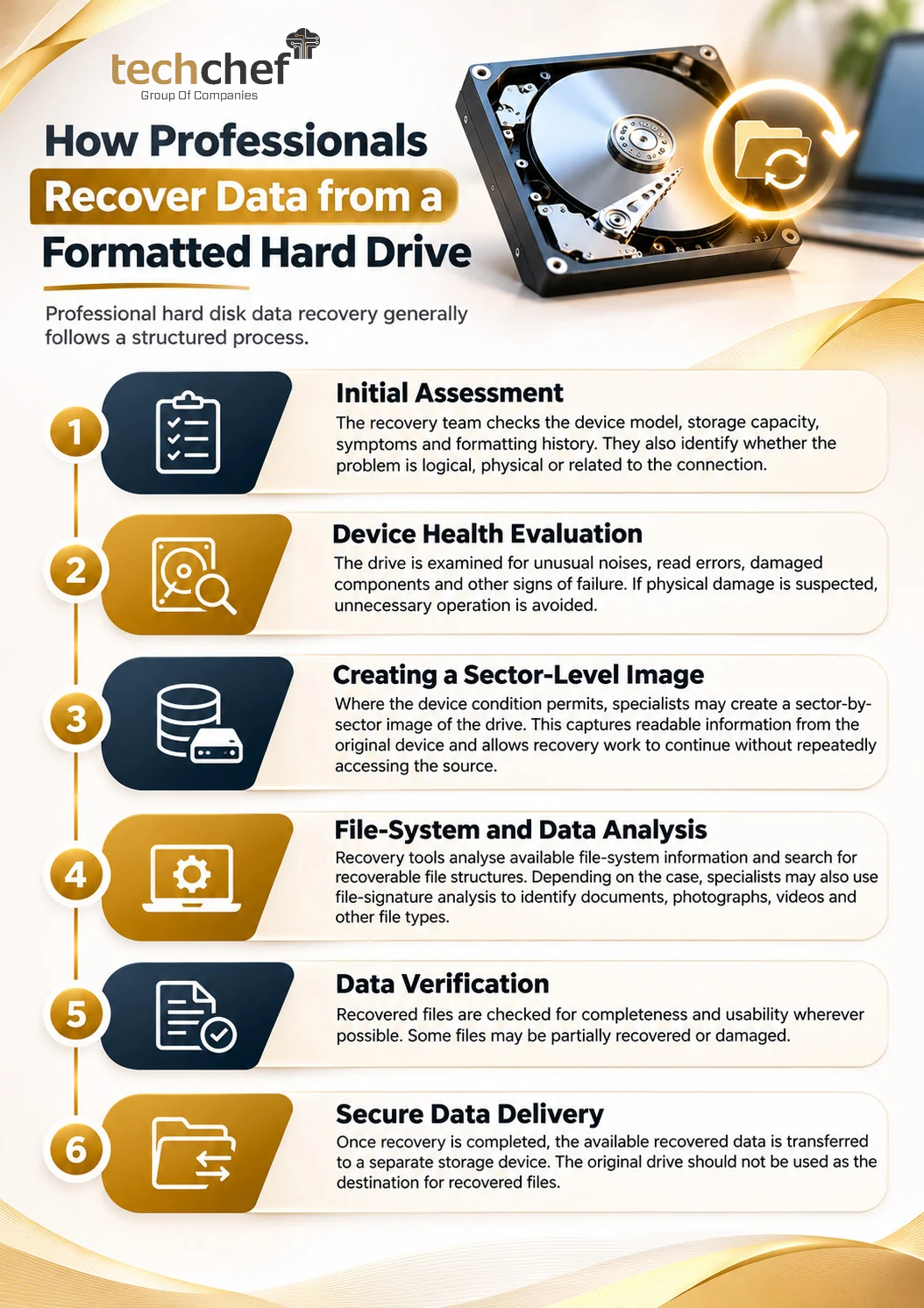
Professional hard disk data recovery generally follows a structured process.
Step 1: Initial Assessment
The recovery team checks the device model, storage capacity, symptoms and formatting history. They also identify whether the problem is logical, physical or related to the connection.
Step 2: Device Health Evaluation
The drive is examined for unusual noises, read errors, damaged components and other signs of failure. If physical damage is suspected, unnecessary operation is avoided.
Step 3: Creating a Sector-Level Image
Where the device condition permits, specialists may create a sector-by-sector image of the drive. This captures readable information from the original device and allows recovery work to continue without repeatedly accessing the source.
For physically unstable drives, the imaging approach must be adapted to minimise further damage.
Step 4: File-System and Data Analysis
Recovery tools analyse available file-system information and search for recoverable file structures. Depending on the case, specialists may also use file-signature analysis to identify documents, photographs, videos and other file types.
Step 5: Data Verification
Recovered files are checked for completeness and usability wherever possible. Some files may be partially recovered or damaged.
Step 6: Secure Data Delivery
Once recovery is completed, the available recovered data is transferred to a separate storage device. The original drive should not be used as the destination for recovered files.
7. What Users Should Avoid After Formatting a Drive
A few common mistakes can reduce recovery chances.
- ⚠️ Do not save new files: New information may overwrite original data.
- ⚠️ Avoid installing recovery software on the affected drive: Installation itself can write data to the device.
- ⚠️ Do not repeatedly format the drive: Additional formatting can complicate recovery.
- ⚠️ Avoid running unnecessary repair commands: Certain repair operations may modify file-system structures.
- ⚠️ Do not open a hard drive yourself: Internal components are sensitive and require suitable handling.
- ⚠️ Do not assume every free recovery tool is safe: Choose tools carefully and understand their limitations.
If the drive is making clicking sounds, repeatedly disconnecting or showing signs of physical damage, stop using it and seek professional assistance.
8. Why Choose TechChef Data Recovery?
Formatted hard drive recovery requires more than simply running a software scan. The correct approach depends on the storage technology, type of failure and condition of the original data.
TechChef provides professional hard drive data recovery assistance for individuals and businesses dealing with formatted, corrupted, damaged and inaccessible storage devices.
The process focuses on understanding the problem, evaluating recovery possibilities and selecting an appropriate recovery approach. This includes assessing logical data loss, identifying physical damage indicators and determining whether specialised recovery methods are required.
For business owners and IT managers, careful handling is especially important when drives contain customer information, financial records or operational documents.
Learn more about TechChef Hard Drive Data Recovery Services or contact our team to discuss your storage device and recovery requirements.
9. Frequently Asked Questions (FAQs)
1. Can I recover files from a formatted hard drive?
Yes, recovery may be possible after a quick format if the original data has not been overwritten. The result depends on the storage device and formatting method.
2. How to recover data from a formatted hard disk without software?
First, check whether a backup exists through Windows File History, Previous Versions, OneDrive or another backup service. If no backup is available, professional recovery assistance may be necessary. There is no guaranteed manual method to restore formatted data.
3. Can I recover formatted data from a hard disk in Windows 10?
Potentially. Stop using the drive and check available backups first. If the data is not backed up, a suitable recovery assessment can help determine whether recovery is possible.
4. Can I recover formatted USB drive data free?
Free recovery tools may help in some logical data-loss situations, particularly after accidental quick formatting. Their effectiveness depends on the device condition and whether data has been overwritten. Never install the tool on the affected USB drive.
5. What if my hard drive is not detecting?
Check the cable, USB port and power supply if it is safe to do so. If the drive remains undetected, makes unusual noises or repeatedly disconnects, avoid repeated attempts and seek professional evaluation.
6. Is free hard disk data recovery software reliable?
Some free tools can recover certain file types, but they may have limitations in file-system support, recovery capacity and physical-damage handling. Software cannot repair physically damaged components.
7. How long does formatted hard drive data recovery take?
The time depends on drive capacity, device condition, failure type and the amount of data involved. A logical recovery may take less time than recovery from a physically damaged device. An assessment is needed to estimate the timeline.
Final Thoughts
Accidental formatting does not always mean permanent data loss, but the actions taken immediately afterward matter. Stop using the affected device, avoid unnecessary experiments and choose a recovery approach based on the actual condition of the drive.
Explore TechChef for professional data recovery assistance and guidance.